
Christmas fonts for Cricut need to do two jobs at once: look festive and survive the blade. A font that is pretty on screen can fall apart once it hits adhesive or heat transfer vinyl, with thin strokes tearing and script letters cutting into separate pieces. This list of Christmas fonts for Cricut rounds up 18 bold, bubbly, chunky, and connected options that cut cleanly and weed without a fight. Each one links to its download page, with project ideas for ornaments, HTV shirts, mugs, wood signs, gift tags, and stocking names. You will also find Design Space setup steps and a licensing note for sellers.
What makes a font good for Cricut?
The best Christmas fonts for Cricut share a few traits. Thick strokes come first: the more vinyl each letter has, the less likely it is to tear or lift while weeding. Simple shapes help too, since distressed edges and tiny decorative dots turn into fiddly pieces.
Watch the counters, the small open spaces inside letters like e, a, and o. Tiny counters are hard to weed and may fill in on HTV. Connected scripts need the Weld tool, or each letter cuts as a separate shape with overlapping lines. As a practical rule, keep block letters at least about 0.75 inch tall for vinyl and give script text more room, around 1.25 inches or larger. Finally, check kerning: letters that touch on screen merge into one blob after cutting, while gaps in a script break the word apart.
18 Christmas Fonts for Cricut
1. Double Bubble

Double Bubble is a fluffy, puffy bubble display face where each letter floats a little on its own. Those soft, wide shapes cut cleanly with no thin joins to tear, and the included outline version is ready-made for a two-color layer. Among bubbly Christmas fonts for Cricut, it is the easiest to weed. Try it on kids’ ornaments.
Best for: kids’ ornaments, stocking names | View Double Bubble
2. Christmas Dream

Christmas Dream is a festive display font built from distinctive hand-drawn characters, so it feels homemade without the spidery strokes of a calligraphy script. The letters stay solid enough to weed on standard adhesive vinyl. Use it for “Merry & Bright” porch-sign wording or a family name across a wooden tray.
Best for: porch signs, wood trays | View Christmas Dream
3. Xmas Groovy

Xmas Groovy is a cute font duo: a script with a few swashes plus a matching display face. Pair the display style for the main word and the script for a short accent like “joy”. Keep the script larger and weld it before cutting. It works well on matching family pajama shirts in HTV.
Best for: family HTV shirts, mixed-font designs | View Xmas Groovy
4. Jollin

Jollin is a bold sans serif in regular and italic, with plenty of alternates and a Christmas-friendly look. Bold sans letters are the easiest thing a Cricut can cut, and the italic adds motion without hairlines. Set short words like “NOEL” or “JOY” for mugs, coasters, and vinyl gift labels.
Best for: mugs, coasters, gift labels | View Jollin
5. WinterLand
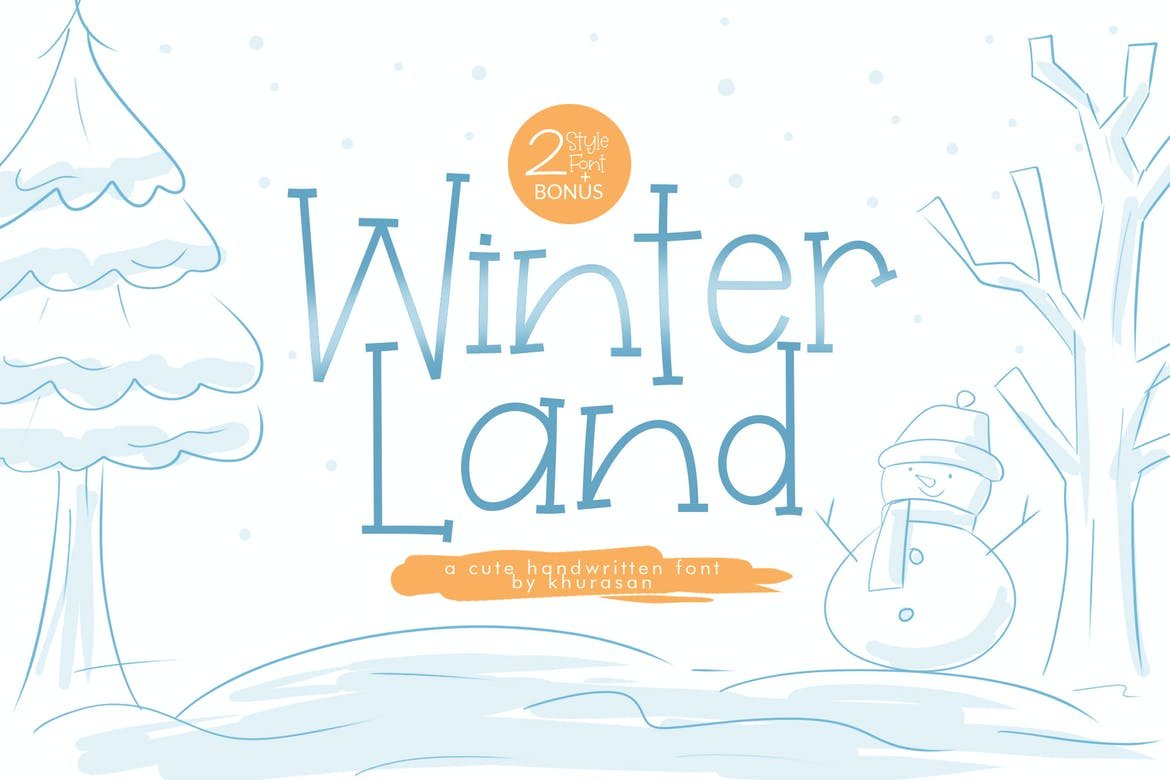
WinterLand is a display typeface with a regular and a slant style, plus full uppercase, lowercase, and numerals. Its sturdy letterforms read clearly from across a room, which makes it a natural pick for headers. Cut it in glitter HTV for a holiday sweatshirt, or use the slant style on a “Let It Snow” banner.
Best for: sweatshirts, banners | View WinterLand
6. Merry Christmas

Merry Christmas is a duo that pairs a decorative headline face with a simple Art Deco-inspired sans serif. Set the decorative style large for the greeting and the sans for small lines such as a date or family name. That clean sans makes it one of the most practical Christmas fonts for Cricut gift tags.
Best for: gift tags, layered signs | View Merry Christmas
7. Kinslee

Kinslee is a modern handwritten calligraphy font that its designer lists for crafting and Cricut use. It includes connected letters and swashes, so words flow as one shape once you weld them. Size it generously, since script strokes are thinner than block letters. It is the go-to connected script among these Christmas fonts for Cricut.
Best for: wine bags, cursive signs | View Kinslee
8. Zilla

Zilla is a chunky, quirky display typeface in regular and rounded versions. The thick, playful strokes leave lots of vinyl to grab onto, so weeding stays quick even at small sizes. The rounded version feels extra friendly for kids’ projects. Cut it in red and green HTV for a “Nice List” toddler tee.
Best for: kids’ tees, playful decals | View Zilla
9. Slob Dough

Slob Dough is a super bold all-caps typeface with a rounded version and a textured version. Pick the rounded one for vinyl, since texture adds tiny gaps that are tough to weed. Its thick letters make a great shadow layer, and it ranks high among Cricut Christmas fonts for a cookie jar or cocoa sign.
Best for: cookie jars, cocoa bar signs | View Slob Dough
10. Lodge

Lodge is a retro chunky serif with thick, distinctive serifs and a 1970s feel. Chunky serifs survive the blade far better than delicate ones, which makes it a smart serif choice among Christmas fonts for Cricut. Cut “The Lodge” or your last name for a farmhouse door sign or a cabin wall decal.
Best for: farmhouse signs, wall decals | View Lodge
11. Rustic Shine

Rustic Shine is a display font with thick, fat, block-like letterforms and a playful retro attitude, plus rich alternates. Blocky shapes have big counters, so the insides of letters such as O and A weed out easily. It looks great on a canvas tote, a chalkboard-style menu, or a bold Christmas Eve box lid.
Best for: totes, Christmas Eve boxes | View Rustic Shine
12. Remock

Remock is a retro bubble font with a Y2K vibe and both uppercase and lowercase letters. Puffy rounded shapes like these are very forgiving on the mat because there are no sharp points to lift. Note that its page marks it personal use only. Use it on a personal ornament or a phone-case vinyl sticker.
Best for: personal ornaments, stickers | View Remock
13. Blum

Blum is a bubble font for logotypes and display use, with a Normal and an Italic variant. The rounded strokes cut smoothly, and the italic gives holiday words a cheerful bounce. Bubble letters often overlap, so weld the word first to cut one outline. It suits kids’ gift tags and ornaments.
Best for: kids’ gift tags, ornaments | View Blum
14. Gunydrops

Gunydrops is a retro, bold, playful display font inspired by 60s and 70s psychedelic design, with stylistic alternates. Its wavy, heavy letters hold up well in HTV and look right on vintage-style shirts. Check spacing after typing, since groovy fonts can sit tight. Try “Groovy Christmas” on a retro sweatshirt or a party banner.
Best for: retro shirts, party banners | View Gunydrops
15. Karl Zone

Karl Zone is a bold, chunky lettered display font with tight spacing and large shapes; its designer suggests sizes above 72pt. That big-and-bold design is exactly what a vinyl cutter likes. Loosen the letter spacing slightly before cutting so letters do not merge. It is strong on a garage-party sign or a bold stocking cuff.
Best for: big signs, stocking cuffs | View Karl Zone
16. Stagheiz Black

Stagheiz Black draws on simple geometric shapes and the bold strokes of 70s vinyl record titles, with rounded forms and discretionary ligatures. The heavy weight keeps every letter sturdy, and the ligatures add character without needing a script. Use it on a retro holiday record-style ornament or a statement mug.
Best for: retro ornaments, mugs | View Stagheiz Black
17. Thunder
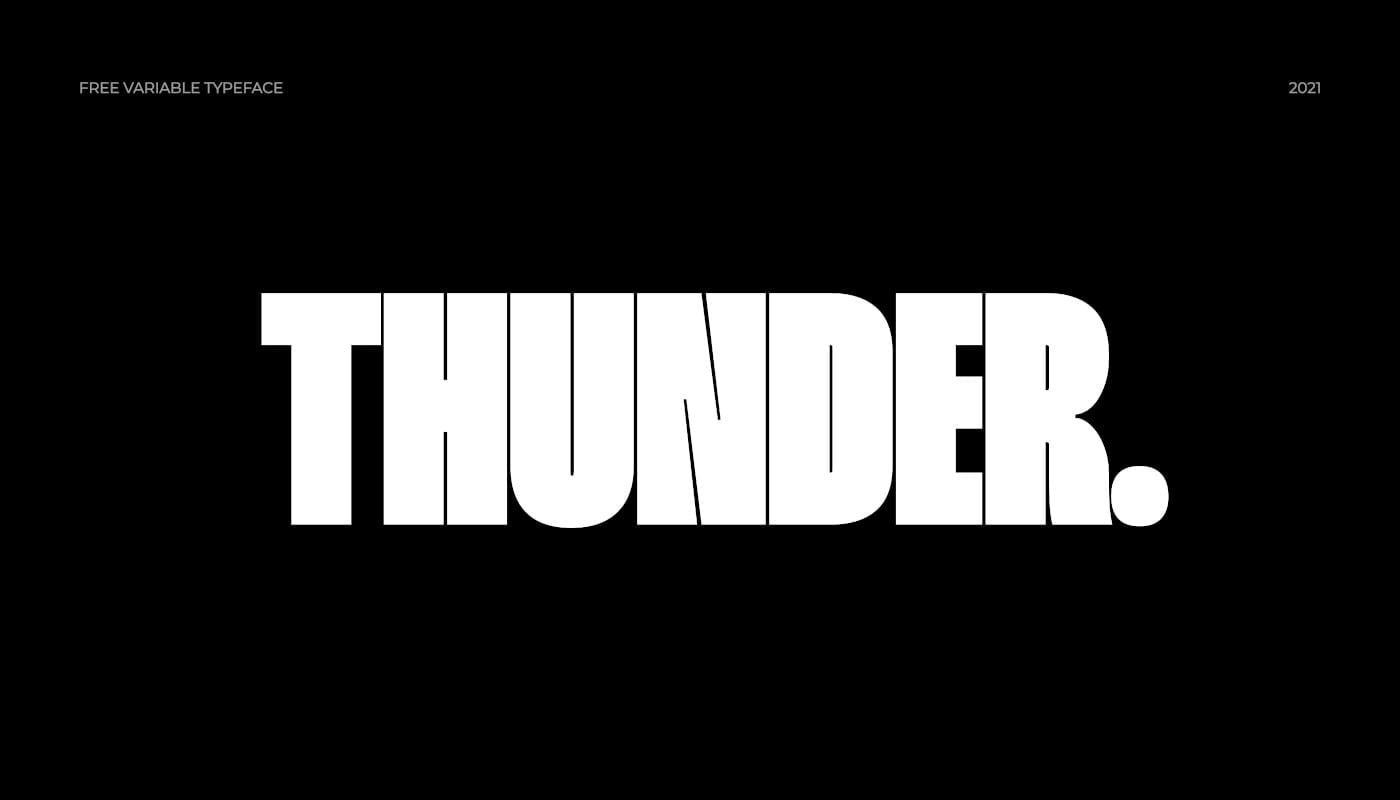
Thunder is a bold, condensed sans serif family with 18 weights, including italics. Use the heaviest weights for cutting; the condensed shape fits longer phrases like “Merry Christmas Y’all” across a shirt or narrow plank. The lightest weights are too thin to weed cleanly on vinyl, so skip those for small text.
Best for: long phrases, narrow wood signs | View Thunder
18. Goodly

Goodly is a modern rounded sans serif family in six weights, friendly but still tidy. Rounded terminals mean no sharp corners to snag during weeding, which helps on small text. Its clean look suits labels and organized gifting. Cut the bolder weights for pantry jar labels, gift bag names, or a minimalist “Joy” decal.
Best for: labels, minimalist decals | View Goodly
How to use these fonts in Cricut Design Space
Design Space reads the fonts installed on your computer, so getting these Christmas fonts for Cricut ready takes a few minutes:
- Download the zip file from the font page.
- Unzip it (Windows: Extract All; Mac: double-click).
- Install the .otf or .ttf file. On Windows, right-click and choose Install. On a Mac, double-click and click Install Font, or use Font Book. Install just one format.
- Fully close Design Space and reopen it. New fonts will not appear until it restarts.
- Add text, open the font list, and choose the System fonts filter.
- Type your text and adjust Letter Space so letters do not overlap or drift apart.
- Weld script text so connected letters cut as one piece, and Attach layers that must stay in the same position on the mat.
- For multi-color designs, use Contour to hide pieces you do not want cut, or Slice to cut one shape out of another.
Cricut Christmas project ideas
Pairings that make the most of these Christmas fonts for Cricut:
- Clear ball ornaments: a child’s name in Double Bubble with the outline version layered on top.
- Family pajama shirts: matching HTV designs in Xmas Groovy, with each person’s name in the script style.
- Hot cocoa mug: “Cocoa Time” in Slob Dough using permanent adhesive vinyl.
- Porch leaner sign: “Merry Christmas” in Christmas Dream on a painted board.
- Gift tags: names cut from cardstock in Goodly for clean small text.
- Felt stocking cuffs: big, bold names in Karl Zone cut from glitter HTV.
- Wine gift bags: a welded cursive greeting in Kinslee.
- Retro holiday sweatshirt: “Have a Groovy Christmas” in Gunydrops.
Licensing for Cricut sellers
Many fonts shared on our site are free for personal use only. That covers ornaments for your own tree and gifts for family. If you sell shirts, ornaments, tumblers, or signs on Etsy or at craft fairs, you usually need a commercial license from the font designer, even for free Christmas fonts for Cricut. Before listing a product, read the license notes on the font page and the readme inside the zip. Rules differ by designer, so never assume a free download covers products you sell.
Premium Christmas fonts with a commercial license
If you sell holiday crafts, paid Christmas fonts for Cricut with a clear commercial license save guesswork. Marketplaces bundle license terms with each download, so you know what covers shirts and decals. You can browse Christmas fonts on Envato to compare styles.
More Christmas font guides
See our roundup of the best Christmas fonts, our picks for Christmas card fonts, and all display fonts.
FAQ
Why doesn’t my font show in Design Space?
Design Space loads system fonts only at startup. Install the .otf or .ttf file (unzipping is not enough), then fully close and reopen Design Space. Then search the System fonts filter by name. A computer restart fixes most stubborn cases.
How do I stop script letters cutting apart?
Select the text box and click Weld. Weld merges overlapping letters into one shape, so Cricut cuts one continuous word. Adjust Letter Space first so every letter touches the next; Weld cannot join letters with gaps.
What size should vinyl lettering be?
When choosing Christmas fonts for vinyl, keep bold block letters at least about 0.75 inch tall on adhesive vinyl or HTV. Scripts and fonts with small counters need more room, so start around 1.25 inches. Do a small test cut first. Script Christmas fonts for Cricut usually need the extra height.
Can I sell Cricut items made with these fonts?
Only if the font license allows commercial use. Many free Christmas fonts for Cricut are personal use only, so selling shirts or ornaments usually requires a commercial license from the designer. Check the font page and the readme file included in the download before you sell anything.


Leave a comment